
Remarkety connects to PrestaShop using PrestaShop's built-in Web Service. When installing Remarkety using the Remarkety module, we set up the appropriate Web Service user and permissions. However, sometimes there are problems related to PrestaShop's own Web Service.
PrestaShop 8 users
If you're using PrestaShop 8, please make sure to install our V2 plugin, as it's required for proper integration.
You can download it here: Download the Remarkety PrestaShop Module
Check if the Web Service is accessible
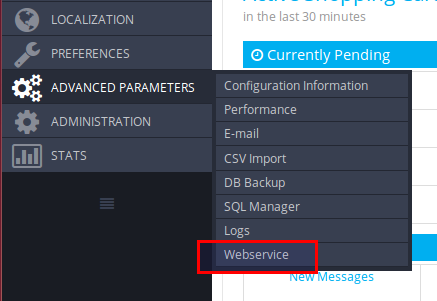
| In your admin interface, go to: Advanced Parameters -> Webservice |
 |
|
Verify that: (1) The Webservice is enabled (2) Remarkety's key is enabled |
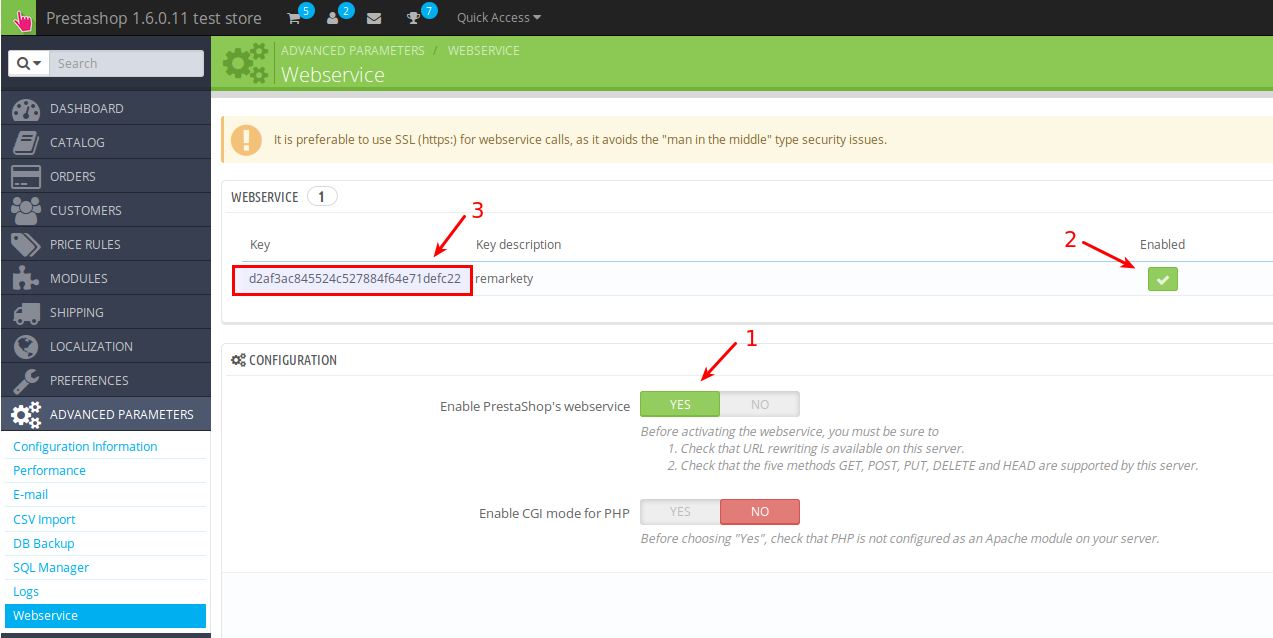 |
Copy the value of the key (3). Now enter this URL in your browser:
http://<your.store.domain>/api?ws_key=<your_key_from_above>
If everything works, you should see an XML in your browser.
If the above web page keeps asking for username/password, there might be a problem with your web server setup that interferes with Prestashop's web service implementation.
Bug in PrestaShop's Orders web service
There's a bug in the current version of PrestaShop which might prevent Remarkety (and anyone else) from accessing the orders via the Web Service.
Open the file:
classes/order/Order.php
Look for this line (should be around line 2092):
public function getWsCurrentState($state)
and change it to:
public function getWsCurrentState()
PS - We've already submitted this patch to PrestaShop and it will be fixed in their next version.
Comments
0 comments